The Real Cost of AI Coding: Usage Limits, Token Tax, and the Future of Software Development
Why Cursor, Copilot, Codex, Claude, Gemini, and Grok are forcing developers to move beyond prompt engineering into context engineering.
TL;DR
AI coding agents are no longer unlimited. Cursor, Copilot, Codex, Claude, Gemini, and Grok are changing how developers think about usage limits, token costs, and context engineering. Why your AI coding agent stops right when it’s about to fix everything — and what usage limits reveal about the future of AI coding. Your agent can read the repo, edit files, run tests, and open PRs — until usage limits hit right when it’s about to fix everything. Maybe take a break and come back 5h later to resume the session. Or you can do this instead…
Click here to read this article if you are stuck behind a paywall
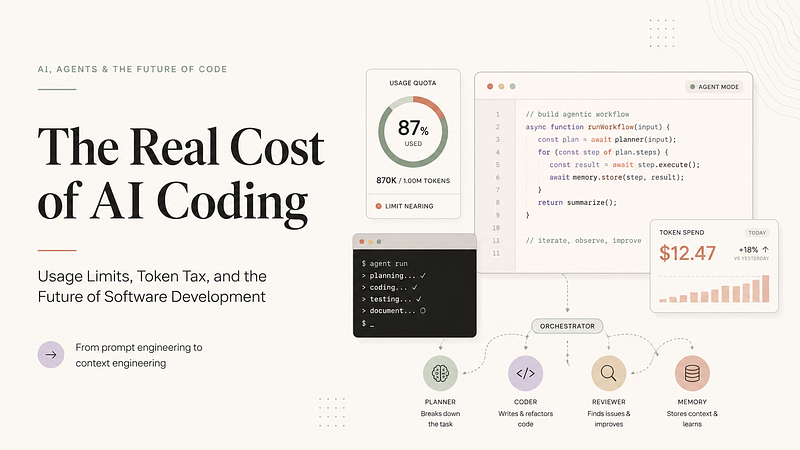
“The future of software development is not just prompt engineering — it is context engineering.”
Your AI Coding Assistant Is Not “Unlimited.” It’s Just Quietly Counting Your Tokens Like a Loan Shark. Do you want to know why your agent dies halfway through a refactor and leaves your repo looking like a crime scene. Keep reading.
There was a beautiful, innocent time when developers believed an AI coding subscription meant:
- “I pay $20 or $100 or $200 a month, and the AI writes code until either the feature ships or capitalism collapses.”
That era is over…
Welcome to 2026, where AI coding agents have become terrifyingly useful, dangerously confident, and expensive enough that every provider has started installing invisible token turnstiles. Your agent can now read your whole repo, plan a migration, edit 47 files, run tests, open a terminal, hallucinate a Docker issue, fix the hallucinated issue, and then suddenly vanish with the emotional maturity of a startup founder during due diligence.
The reason is simple:
Agentic coding burns compute like a wedding buffet burns cash.
The original subscription fantasy was based on chatbots answering questions. But modern AI coding tools are not just answering questions anymore. They are reading repositories, calling tools, running tests, opening pull requests, reviewing code, triggering cloud agents, using MCP servers, interacting with Jira tickets, and running multi-step autonomous workflows.
That changes everything.
The old question was:
- “How many messages do I get?”
The new question is:
- “How many tokens, tool calls, retries, terminal loops, model multipliers, cached inputs, agent runs, parallel workflows, and emotional support prompts did I just burn?”
And that is why the so-called “unlimited AI coding subscription” is quietly mutating into something much more familiar to developers:
Cloud API billing with better marketing…
The Big Shift: From Prompting to Agentic Compute
The AI coding market has moved from simple assistant mode into agentic execution.
In 2023, you asked:
- “Write me a function.”
In 2026, you ask:
- “Investigate the auth bug, inspect the logs, reproduce the issue, patch the session handling, update the tests, open a PR, and don’t break production.”
That second request is not a prompt. It is a job.
And jobs have cost.
OpenAI’s Codex rate card makes this especially clear. Codex now uses model-specific credit pricing tied to input tokens, cached input tokens, and output tokens. GPT-5.5 in Codex is listed at 125 credits per 1M input tokens, 12.50 credits per 1M cached input tokens, and 750 credits per 1M output tokens. OpenAI also notes that average Codex usage may vary widely, with usage depending on model choice, instances, automations, and fast mode. (OpenAI)
Translation:
- “Your AI coding agent is no longer a chatbot. It is a junior engineer with a corporate card.”
1. GitHub Copilot: From “Autocomplete Buddy” to Metered AI Workbench
GitHub Copilot used to feel simple. You paid, it completed code, everyone pretended the suggestions were definitely not copied from a Stack Overflow answer you once disliked.
That simplicity is disappearing.
GitHub has been moving Copilot toward usage-based economics. Its official documentation describes premium request allowances and usage limits, while GitHub’s own announcement says Copilot plans are transitioning to usage-based billing with GitHub AI Credits calculated from token consumption, including input, output, and cached tokens. (GitHub Docs)
Copilot also has session and weekly limits. GitHub says Copilot has a session limit and a 7-day weekly token limit. If you hit the session limit, you wait for reset. If you hit the weekly limit but still have premium requests remaining, you may continue with Auto model selection, while manual model choice returns when the weekly window resets. (GitHub Docs)
What this means for developers
Copilot is no longer just “autocomplete with vibes.” It is becoming a metered AI workbench.
Inline completions remain the low-friction layer. But advanced chat, agent mode, premium models, code review, and deeper workflows increasingly sit behind usage accounting.
Copilot is like a gym membership where the treadmill is included, but every time you ask the personal trainer to redesign your life, debug your knees, and rewrite your nutrition plan, a tiny cash register goes:
ka-ching…
Use Copilot’s agent features for bounded work.
Bad Copilot task:
- “Modernize our platform.”
Good Copilot task:
- “Update this React component from legacy props to the new design-system API. Do not touch routing. Add or update tests only for this component.”
2. OpenAI Codex: The Agent Has a Rate Card Now
Codex is one of the clearest signals of where AI coding is going.
It is not just “ChatGPT for code.” It is a coding agent platform with model routing, fast mode, automations, subagents, and token-priced usage. OpenAI’s Codex model documentation positions GPT-5.5 for complex coding, computer use, knowledge work, and research workflows, while smaller/faster models are better suited for simpler coding tasks and subagents. (OpenAI)
The important shift is economic:
Codex usage is increasingly token-cost aware.
A giant repo prompt, a verbose planning loop, a large output diff, a failed test loop, a retry loop, and a parallel subagent swarm are all meaningfully different from a simple “write a helper function” prompt.
Codex is brilliant, but it now behaves like AWS:
Everything is fine until you check the dashboard and realize your “small experiment” has become a financial event.
A recent example shows where this can go at the extreme end: OpenClaw’s creator reportedly burned through more than $1.3 million in OpenAI API tokens in 30 days across millions of requests and hundreds of billions of tokens, driven by autonomous coding agents. That is obviously not normal individual usage, but it is a very loud warning siren for where agentic coding economics are heading. (Tom’s Hardware)
Do not throw the entire repo into every Codex task.
Use scoped context:
- one bug
- one failing test
- one module
- one migration step
- one acceptance criterion
Your agent should not need to read your company’s entire engineering history to rename a button.
3. Claude Code: Bigger Limits, Same Cliff Edge
Claude Code remains one of the strongest tools for serious multi-file reasoning, repo comprehension, and careful refactoring.
Anthropic recently increased capacity for heavy users. On May 6, 2026, Anthropic announced that it was doubling Claude Code’s five-hour rate limits for Pro, Max, Team, and seat-based Enterprise plans, removing peak-hour limit reductions for Pro and Max, and raising API rate limits for Claude Opus models. (Anthropic)
That is excellent news for developers.
But the basic workflow risk remains:
when an agentic coding session hits a limit, the work can stop at the worst possible moment.
Claude Code may be halfway through a migration, test rewrite, or multi-file patch when the session window runs out. That does not mean Claude is bad. It means autonomous coding is not the same as a chat conversation.
Claude Code is like a very smart contractor.
It starts by saying:
- “I understand the architecture.”
Three hours later, half your monorepo is renovated, the kitchen wall is missing, and Claude says:
- “Usage limit reached.”
Use Claude Code like a senior engineer, not like a possessed Roomba.
Give it:
- a task brief
- file boundaries
- acceptance criteria
- test commands
- rollback instructions
- and a stop condition
Bad Claude Code task:
- “Refactor the backend.”
Good Claude Code task:
- “Refactor only the payment retry logic in
billing/retry.ts. Preserve public API behavior. Add regression tests for failed card retry and webhook retry. Stop after tests pass or after two failed attempts.”
4. Google Gemini Code Assist and Gemini CLI: Huge Context, Real Quotas
Google’s developer tooling has one major superpower:
huge context.
Gemini Code Assist officially lists local codebase awareness with a 1,000,000-token context window. That is extremely useful for large codebases, documentation-heavy projects, and cross-file reasoning. (Google for Developers)
But huge context does not mean infinite usage.
Google’s quota documentation says Gemini Code Assist agent mode and Gemini CLI share quotas. One prompt can result in multiple model requests. Daily request limits are aggregated across model families such as Pro and Flash. Current listed daily limits include 1,000 requests for individuals, 1,500 for Google AI Pro, and 2,000 for Google AI Ultra / Enterprise-style tiers. Once the daily maximum is reached, no further requests can be made through those interfaces until reset. (Google for Developers)
Google also notes that Gemini Code Assist IDE Extensions and Gemini CLI for certain tiers will stop serving requests from June 18, 2026, as Google unifies tooling into its Antigravity multi-agent platform. (Google for Developers)
Gemini is the friend with a massive backpack.
It can carry your repo, logs, API docs, README, architecture notes, test failures, and possibly your childhood trauma.
But it still has a step counter.
Do not confuse large context with good context.
A 1M-token window can be a superpower. It can also become a 1M-token confusion blender.
Bad Gemini task:
- “Here is my whole repo. Improve it.”
Good Gemini task:
- “Use the repository context to understand the auth module, but only modify the token refresh path. Focus on these three files. Ignore unrelated frontend code.”
5. xAI Grok 4.3: Big Context, Spend-Tiered API Reality
xAI’s official model documentation lists Grok 4.3 as a new model with strong agentic tool calling, configurable reasoning, and a 1 million-token context window. It also lists token pricing for the model. (docs.x.ai)
For API usage, xAI uses spend-tiered limits with per-model requests per minute and tokens per minute. Exceeding those limits returns the familiar developer love letter:
429 Too Many Requests
Grok 4.3 has a giant brain and a giant context window, but the API still says:
“Cool story. Your tier says no.”
For serious coding use, treat Grok as API infrastructure, not a casual chat toy.
Track:
- RPM
- TPM
- model aliases
- context size
- tool calls
- and reasoning settings
A 1M-token context window is powerful, but it is also a very large pipe connected to a very real meter.
6. Cursor: The AI Editor That Became an Agent Farm
Cursor absolutely belongs in this article because it is one of the clearest examples of how fast AI coding is evolving.
Cursor started as:
- “VS Code, but haunted by a helpful AI ghost.”
Now it is much more serious.
Cursor’s pricing page describes plans for different levels of agentic usage. It recommends Pro+ for daily agent users and Ultra for agent power users, while Teams and Enterprise plans are aimed at collaboration, pooled usage, invoicing, and advanced security. (Cursor)
Cursor’s current feature surface includes Agent, Cloud Agents, frontier models, MCPs, skills, hooks, Bugbot, and usage-based billing. The result is that Cursor is no longer just a smarter editor. It is becoming a full AI-native development environment.
The latest Cursor changelog shows how far this has gone. Cursor is now available in Jira. Developers can assign work items to Cursor or mention @Cursor in a Jira comment to kick off a cloud agent. Cursor uses the ticket title, description, comments, and repository settings to scope the task. It can fix bugs, add features, update tests, investigate issues, and then link back to the resulting pull request. (Cursor)
Cursor also released Composer 2.5, which it describes as a substantial improvement over Composer 2 for sustained long-running work, complex instructions, and collaboration. Cursor lists Composer 2.5 pricing at $0.50/M input and $2.50/M output tokens for Standard, and $3.00/M input and $15.00/M output tokens for Fast/default. (Cursor)
Cursor used to whisper:
- “Maybe rename this variable?”
Now Cursor reads your Jira ticket, opens your repo, creates a branch, writes code, updates tests, opens a PR, and then quietly asks whether you would like to spend more usage on deeper reasoning.
Cursor is no longer autocomplete.
Cursor is middle management for AI agents.
What this means for developers
Cursor is powerful because it sits exactly where developers live:
- inside the editor
- inside the repo
- inside the terminal
- inside the PR workflow
- and now inside Jira
That makes it convenient.
It also makes it dangerous.
The danger is not that Cursor is bad. The danger is that it makes agentic execution feel frictionless.
One vague Jira ticket can become a Cloud Agent run.
One broad instruction can become a multi-file PR.
One “quick fix” can become a diff so large your reviewer starts questioning their career choices.
Cursor works best when your tickets are already engineered for context.
Bad Cursor task:
- “Fix auth.”
Good Cursor task:
- “Fix the refresh-token expiry bug in
auth/session.ts. Do not modify OAuth provider logic. Add one regression test for expired refresh tokens. Runpnpm test auth. Keep the PR under 300 changed lines.”
That is the difference between an AI coding assistant and a caffeinated raccoon with repository access.
The Real Problem: Developers Are Still Prompting Like It’s 2023
Most developers still treat AI coding tools like magic autocomplete.
That worked when the task was:
“Write a regex.”
It breaks when the task is:
“Refactor our auth system, migrate the DB schema, fix flaky tests, update docs, and don’t break production.”
That second task is not a prompt.
It is an engineering project.
And engineering projects need boundaries.
AI coding tools are now powerful enough to create real value and real damage. They can ship features faster, but they can also generate sprawling diffs, hidden regressions, broken abstractions, accidental rewrites, and token bills that make finance ask why the chatbot is behaving like a cloud migration.
This is why the next developer skill is not just prompt engineering.
It is context engineering.
Prompt Engineering Is Dead. Long Live Context Engineering.
Prompt engineering asks:
“What should I say to the model?”
Context engineering asks:
“What should the model know, what should it ignore, what tools can it use, what tests define success, what budget can it burn, and when should it stop?”
That is the real discipline developers need now.
A good AI coding workflow in 2026 should include:
1. Task scoping
Give the model one bounded job, not your entire quarterly roadmap.
Bad:
“Improve the backend.”
Good:
“Fix the retry logic for failed payment webhooks only.”
2. Context selection
Do not dump the whole repo unless the task truly requires it.
Give the model the relevant files, logs, tests, docs, and constraints.
Context is not free. Irrelevant context is not harmless. Irrelevant context is where models go to develop opinions.
3. Model routing
Use cheaper and faster models for simple work.
Use frontier models for architecture, debugging, deep reasoning, and high-risk changes.
Not every task deserves the most expensive brain in the building.
Sometimes you need Opus-class reasoning.
Sometimes you need a tiny model to change a CSS class and stop being dramatic.
4. Plan before execution
Ask for a plan first.
Then approve the smallest safe implementation unit.
This prevents the classic AI-agent disaster pattern:
“I made a few improvements.”
Translation:
“I rewrote the auth system, invented a new abstraction, and deleted two tests because they were annoying.”
5. Checkpointing
Agents should summarize after each phase.
They should commit or pause after meaningful milestones.
A rate-limit crash should not leave your repo in a half-mutated fever dream.
6. Tool budget awareness
Parallel agents, long terminal loops, repeated test runs, huge outputs, image/video inputs, and giant contexts are not free.
Every “let’s just try again” has a cost.
Every “run the full suite again” has a cost.
Every “inspect the whole repo” has a cost.
7. Stop conditions
Tell the agent when to stop.
Tell it when to ask.
Tell it what not to touch.
Tell it what “done” means.
Without stop conditions, an AI agent may continue “helping” until your codebase achieves enlightenment or bankruptcy.
Why Rate Limits Are Changing
The rate-limit story is not random cruelty from AI companies.
It is the unavoidable result of four forces colliding:
1. Frontier models are expensive
Reasoning models, long-context models, multimodal models, and agentic tool-using models consume serious compute.
A single autonomous coding run can involve many hidden model calls.
2. Agents multiply usage
A normal user sends one prompt.
An agent may:
- read files
- write files
- search code
- run commands
- inspect errors
- retry
- summarize
- spawn subagents
- review its own work
- and generate a final report
That is not one request.
That is a small software team made of tokens.
3. Long context changes the economics
A 1M-token context window is not just a feature.
It is a billing event waiting for a reason.
The ability to ingest everything creates the temptation to ingest everything. Developers need to resist that temptation.
4. Providers are moving from “growth subsidy” to “unit economics”
The early AI coding market was subsidized.
The next phase is metered.
Expect more:
- token-based pricing
- usage dashboards
- model multipliers
- plan-based included usage
- pooled team usage
- premium model gates
- auto-routing
- hard caps
- overage controls
- and enterprise budget governance
The buffet is becoming à la carte.
The Future of AI Code Usage
The future is not “one AI tool to rule them all.”
The future is layered.
You will likely use:
- autocomplete models for inline suggestions
- fast models for routine edits
- frontier models for difficult reasoning
- repo-aware agents for scoped implementation
- cloud agents for background PRs
- ticket-connected agents for Jira/GitHub workflows
- MCP-connected tools for internal systems
- and usage dashboards to prevent financial jump scares
The AI-native developer workflow will look less like chatting and more like orchestration.
Developers will increasingly act as:
- context designers
- model routers
- reviewer-operators
- test authors
- workflow governors
- and budget-aware agent managers
In other words:
the developer is not being replaced.
The developer is being promoted to manager of several very fast, very confident, occasionally chaotic interns.
Congratulations. HR is not involved.
Final Take: The Best Developers Will Not Write the Longest Prompts
The lesson from Copilot, Codex, Claude Code, Gemini, Grok, and Cursor is the same:
AI coding is becoming operational infrastructure.
It is no longer:
“Ask model, get code.”
It is now:
“Route task, select model, provide context, constrain tools, manage usage, review diff, run tests, checkpoint progress, and control cost.”
That is why context engineering is becoming a core developer skill.
Prompt engineering was about clever phrasing.
Context engineering is about building the right working environment for the model.
It defines:
- what files the agent sees
- what tickets it reads
- what tools it can call
- what tests define success
- what budget it can burn
- what it must not change
- and when it should stop
Cursor makes this especially obvious because it brings agents directly into the developer workflow. If your Jira tickets are vague, your repo is messy, your tests are weak, and your acceptance criteria are “make it better,” the AI agent will happily produce a confident mess at machine speed.
The next great developer will not be the person who writes the longest prompt.
It will be the person who gives the model exactly enough context to succeed without burning the monthly quota before lunch.
Because in 2026, the scariest sentence in software is no longer:
“It works on my machine.”
It is:
“I asked the agent to fix it.”
Conclusion: The Future of AI Coding Belongs to Developers Who Can Ride the Exponential Curve
AI coding is not growing linearly.
It is not improving in neat yearly increments.
It is entering an exponential iteration phase.
Every few months, the loop gets faster: better models, larger context windows, stronger agents, deeper IDE integration, automated PRs, ticket-based agents, cloud agents, MCP-connected tools, multimodal debugging, self-reviewing code assistants, and increasingly autonomous engineering workflows.
What looked futuristic last year now looks basic.
What looks expensive today may become commodity tomorrow.
And what feels like “cheating” today may soon become the default way software is built.
But this creates a strange paradox.
As AI coding tools become more powerful, developers do not become less important.
They become more responsible.
Because the bottleneck is shifting.
The old bottleneck was:
- “Can I write the code?”
The new bottleneck is:
- “Can I define the right problem, provide the right context, choose the right model, control the agent, verify the output, and avoid burning compute on the wrong task?”
That is why usage limits matter. They are not just annoying product restrictions. They are early warning signs of a bigger transformation.
They tell us that AI coding is becoming infrastructure.
And infrastructure must be governed.
The developer who survives this shift will not be the one who refuses AI. That developer will simply become slower.
But the developer who blindly delegates everything to AI will not win either. That developer will create expensive chaos at machine speed.
The winning developer will sit in the middle.
They will know when to code manually, when to use autocomplete, when to ask a chat model, when to launch an agent, when to use a frontier reasoning model, when to use a cheaper model, when to stop the agent, and when to reject the output.
In other words, the future belongs to the AI-native developer.
Not the developer who knows the most prompts.
The developer who knows how to design the best context.
How Developers Stay Relevant
To stay relevant in the age of Cursor, Copilot, Codex, Claude, Gemini, and Grok, developers need to upgrade their role.
1. Move from coder to problem framer
AI can generate code quickly. But it still needs a clear problem.
The most valuable developer will be the person who can turn vague business pain into precise technical tasks.
Bad task:
- “Make onboarding better.”
Good task:
- “Reduce onboarding drop-off by adding passwordless login, preserving the current auth schema, and measuring completion rate from invite click to first workspace creation.”
Problem framing becomes a superpower.
2. Learn context engineering
Prompt engineering is not enough.
Context engineering means deciding:
- what the model should see
- what it should ignore
- which files matter
- which tests define success
- which tools it can use
- what budget it can spend
- and where it must stop
“The best AI users will not write longer prompts. They will create cleaner working environments for agents.”
3. Become excellent at verification
AI will write more code. That means humans must become better at review.
The future developer needs strong judgment around:
- architecture
- security
- performance
- data privacy
- edge cases
- test coverage
- maintainability
- and business impact
The question will not be:
- “Can the AI produce code?”
It will be:
- “Can you tell whether the code should exist?”
4. Build taste, not just syntax
Syntax is becoming cheaper.
Taste is becoming more valuable.
Good developers will be recognized by their ability to say:
- “This works, but it is the wrong abstraction.”
Or:
- “This patch passes tests, but it makes the system harder to evolve.”
Or:
- “The agent solved the symptom, not the root cause.”
“AI can generate options. Developers must develop taste”.
5. Understand AI economics
Usage limits, token tax, model routing, cached inputs, context size, and agent loops are becoming part of software economics.
Future developers will need to know not only whether a solution works, but also whether it is worth the compute.
A careless AI workflow can turn one bug fix into a hundred-dollar investigation.
A well-scoped AI workflow can solve the same problem in minutes.
Cost-aware engineering will become part of engineering maturity.
6. Use AI to compound yourself
The goal is not to compete with AI at typing speed.
That game is over.
The goal is to use AI to multiply your judgment.
Use AI to:
- explore unfamiliar codebases
- generate test cases
- compare architectures
- write migration plans
- find edge cases
- summarize incidents
- draft documentation
- prototype quickly
- and challenge your assumptions
The developer who uses AI as a thinking partner will outperform the developer who uses it as a vending machine.
Final Take Away Message
The future of software development will not be human-only, and it will not be AI-only.
It will be human-led, AI-accelerated engineering.
The tools will keep changing. The models will keep improving. The context windows will keep expanding. The agents will keep getting more autonomous. The usage limits will keep evolving because the underlying compute is real.
But the core skill will remain deeply human:
knowing what is worth building, why it matters, how to constrain the work, and whether the result is good enough to trust.
That is the real future of AI coding.
Not unlimited agents.
Not magic prompts.
Not one-click software.
But developers who can combine judgment, context, taste, verification, and AI leverage.
Because the next generation of software will not be built by developers who simply ask AI to “fix everything.”
It will be built by developers who know exactly what “fixed” should mean.
If this article helped you think differently about AI coding, please clap, bookmark, and share it with your developer circle. The future belongs to builders who know how to use AI agents wisely — without letting usage limits, token tax, and context chaos eat the whole sprint.
Comments ()